Your password-recovery page says it sent an email, but your inbox stays empty. A PHP mail not working problem can start inside your script, at the server’s mail transport, or after another server accepts the message. Repeatedly clicking Send won’t identify which one failed. A single test message with a recorded timestamp will.
For couponPHP, a self-hosted PHP coupon and deal website script, missing email can affect administrator recovery as well as subscriber notifications. Its coupon-site features include newsletters, so a working login page isn’t enough evidence that the whole email path works.
PHP mail not working: separate submission from delivery
Say your site queues a recovery email at 09:10. The application reports success, yet nothing arrives by 09:15. That success may describe queue creation rather than SMTP delivery. First check whether the message left the application queue. The email cron setup guide explains the background task used by the recovered script.
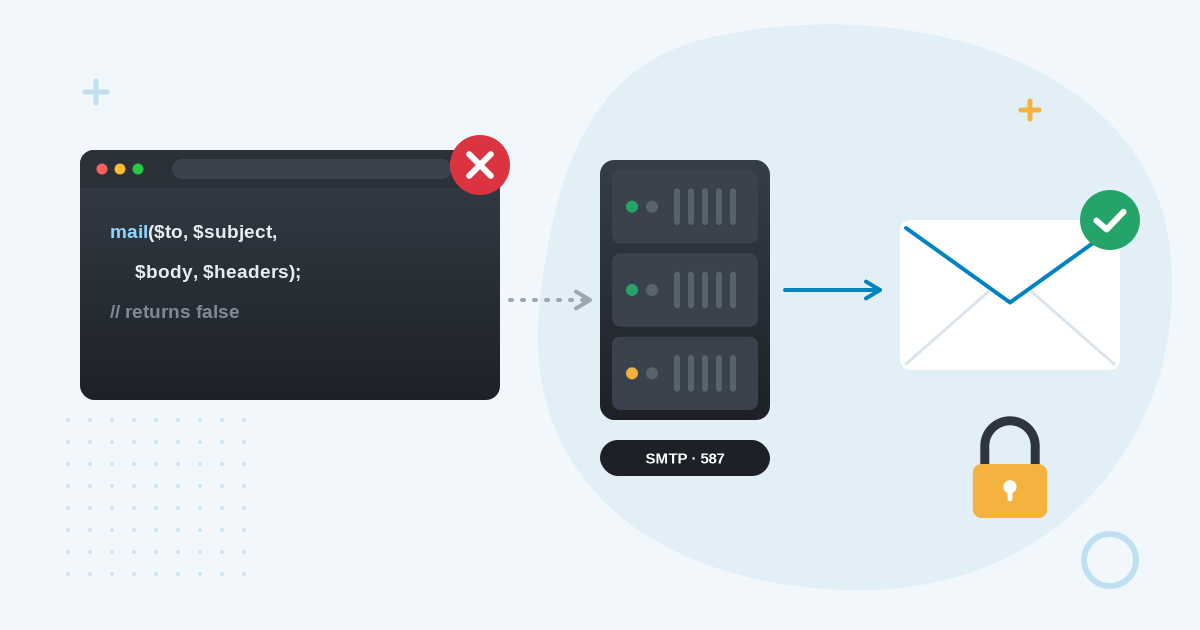
If the code actually calls mail(), inspect its return value and PHP error log. The PHP Group’s mail manual, consulted in 2026, says true means accepted for delivery; it doesn’t mean the intended recipient received it.[1] A false result points you back to submission. A true result sends you forward to the transport queue, bounce address and recipient filtering.
That distinction saves time. Changing an SMTP password won’t repair a cron task that never runs. Editing your newsletter template won’t install a missing mail transport.
Run a small test without exposing your server
A full newsletter introduces too many variables for a PHP mail not working test: queue processing, recipient lists and message formatting. Use one known mailbox you control and a sender address on your own domain. This example uses fixed values rather than visitor input, which avoids turning the diagnostic into an open mail form.
<?php
$accepted = mail(
    'operator@example.net',
    'Website mail transport test',
    "One diagnostic message.\r\n",
    "From: notifications@example.com\r\n"
);
error_log('Mail transport accepted: ' . ($accepted ? 'yes' : 'no'));
The addresses are placeholders. Replace them, run the test through the same PHP runtime as the website, and keep the test behind authentication. You can remove it afterward. A terminal test alone can mislead you because command-line PHP and web PHP may load different configuration files.
Don’t suppress warnings with @mail(). You need the error. Keep production errors in a private log rather than displaying them to visitors, and don’t put passwords or recovery message bodies into diagnostic output.
Check sendmail_path and the actual transport
On a Linux server, an installed PHP interpreter doesn’t automatically provide a working mail transfer agent, or MTA. That’s the software that accepts and relays messages. A missing executable, an inactive queue or a wrong path can prevent submission.
The PHP Group’s runtime configuration documentation, consulted in 2026, describes sendmail_path as the command PHP uses for this transport.[2] On a server you administer, the relevant configuration might look like this:
; Only valid if this executable exists and is configured to relay mail.
sendmail_path = "/usr/sbin/sendmail -t -i"
log_errors = On
display_errors = Off
This line doesn’t install sendmail or configure its relay. A server administrator can confirm the executable exists and inspect its service and queue. On shared hosting, give support the test timestamp, recipient and warning; you usually can’t repair the system MTA yourself.
The SMTP and smtp_port php.ini directives apply to Windows, not the normal Unix sendmail transport.[2] So setting SMTP = mail.example.com on Linux won’t give mail() authenticated SMTP. Nor can a script reliably change a startup-level sendmail_path setting with ini_set().
Use authenticated SMTP when your application supports it
A shared server’s local mail transport may have restricted sending limits or poor diagnostics. Authenticated SMTP gives your application a defined submission endpoint and credentials. It still needs correct configuration, and it doesn’t guarantee inbox placement.
In the recovered admin interface, the email settings are under Configuration → Manage Accounts → Email. Match the SMTP hostname, username, password and encryption mode to the account’s documented settings. The sender address should be one the account is allowed to send as.
The IETF’s RFC 8314 (2018) describes implicit TLS submission on port 465 and STARTTLS on port 587.[3] These modes aren’t interchangeable. Port 465 begins encryption immediately; STARTTLS upgrades an established connection. Your application’s mail component must support the selected mode and validate the server certificate.
A connection timeout suggests DNS, firewall or outbound-port trouble. An authentication rejection suggests credentials or account policy. A certificate error calls for hostname, certificate and trust-store checks—not disabling certificate verification. If the old mail component can’t meet current requirements, ask script support about a supported update before changing production code.
Fix sender authentication after transport works
A message can leave your server and still be rejected. For example, your site’s visible From address might use your domain while the SMTP relay authenticates an unrelated domain. You need to examine a received test message’s authentication headers, not guess from its subject line.
NIST’s Email Authentication Mechanisms report (2017) describes SPF source authorization, DKIM message authentication and DMARC reporting.[4] In practice, your sending service supplies the DNS records and signing settings for its authorized route. SPF authorizes sending infrastructure for the envelope-sender domain; DKIM attaches a verifiable signature.
DMARC also checks domain alignment. IETF RFC 7489 (2015) explains that a passing SPF or DKIM result must align with the visible From domain for DMARC to pass.[5] Authentication success doesn’t promise inbox placement, but a broken setup gives receiving systems a reason to distrust the message.
For a contact form, keep From on your domain and place the visitor’s validated address in Reply-To. Don’t concatenate unchecked visitor input into mail headers: the PHP manual warns that outside data can inject unwanted headers.[1]
The original 2016 update
This announcement records the recovery behavior and SMTP fix released on 22 August 2016. It isn’t a claim that emailing newly generated passwords is the preferred design today. Confirm which behavior your installed version uses.
Today we are rolling out a fix that solves two problems some of our customers have written us about:
- Admin password recovery
- SMTP account email sending issue
So, we’ve added a new link to the admin login form that leads to an admin password recovery page of your CouponPHP script. It uses your mail delivery settings from the admin panel to deliver a newly generated password.
SMTP account to send notifications and commercial emails can be set up in your admin panel in Configuration → Manage Accounts → Email. Check the checkbox Use SMTP and fill in the form with your SMTP credentials. Please remember to set up email sending properly right after the script installation; otherwise it would be much harder to recover your lost admin password.
In some cases even after filling in the form the email sending functionality could not work properly, and this current fix provides correct email sending files to ensure correct email delivery.
To get this new update please send us an email to support@couponphp.com.
Frequently asked questions
Why does PHP mail return true but no email arrives?
A true result means the message was accepted for delivery by the configured transport. It doesn’t confirm arrival in the recipient’s inbox. Check the outgoing mail queue, bounce messages and recipient spam folder. Then inspect sender authentication and SMTP logs to find where the message stopped.
Can I fix PHP mail by changing SMTP in php.ini?
The SMTP and smtp_port directives apply to PHP’s direct SMTP transport on Windows. Unix hosting normally uses the command configured in sendmail_path. For authenticated SMTP on shared hosting, use your application’s SMTP settings or a compatible maintained mail library rather than assuming those php.ini directives configure authentication.
How should I test admin password recovery safely?
First verify the administrator email address and test ordinary application email. Keep an authenticated admin session open while testing recovery in another browser session. Confirm the message arrives and the recovery flow works. If the historical flow emails a generated password, change it promptly and ask about a supported reset-link update.
Keep evidence of one successful recovery
Before closing your installation checklist, record one successful recovery test and its delivery timestamp. Store the configuration securely, without credentials in your notes. The next time you face PHP mail not working, you’ll have a known-good route to compare against.