A shopper saves a £35 kitchen deal, taps the Facebook button and returns to your site still logged out. The button looks fine. The failure may sit in an outdated callback, an app permission or the PHP session. A working Facebook login PHP integration needs all those pieces to agree, not just an app ID pasted into a form.
couponPHP is a self-hosted PHP coupon and deal script with user accounts and historical Facebook and Twitter login features. That makes social sign-in relevant to saved offers, but it doesn’t establish that a recovered installation supports today’s provider APIs. Your installed version and authentication adapter need checking first.
Facebook login PHP: follow the authorization-code path
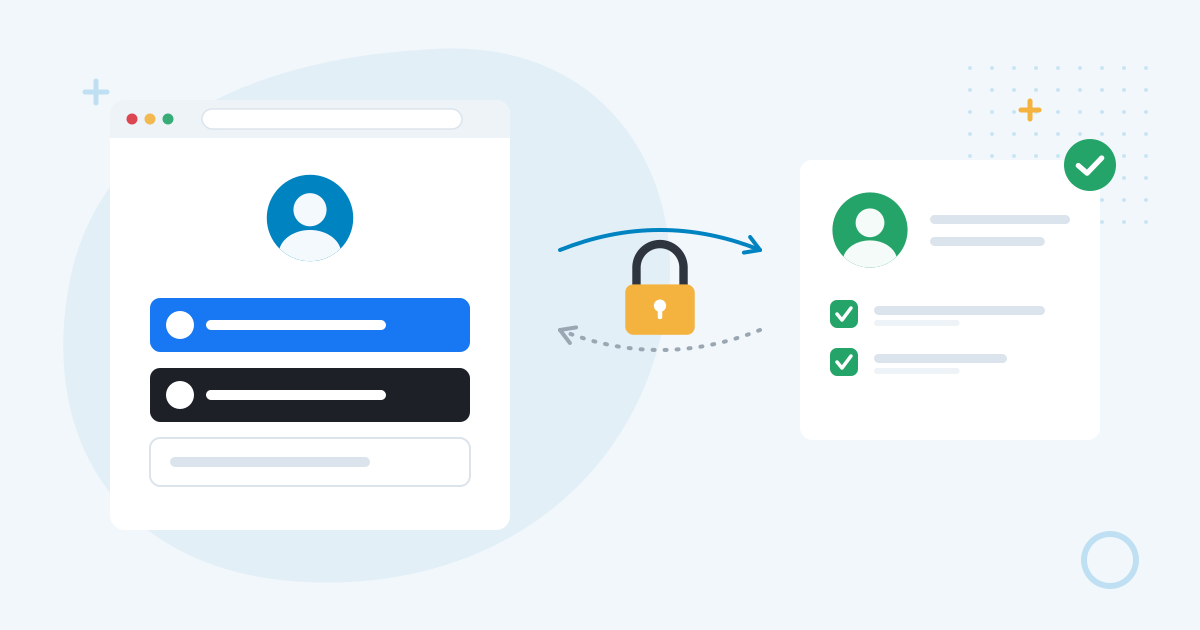
A callback containing an account name isn’t proof of identity. Anyone could request that URL. In the authorization-code flow, PHP receives a short-lived code, exchanges it with the provider on the server, then retrieves and verifies the provider’s user identity before opening a local session.
The IETF’s OAuth 2.0 framework (2012) separates authorization from authentication. For social login, your application must use the provider’s supported identity response; it can’t treat any access token as a universal identity document.
A practical implementation has these stages:
- Your application generates an unpredictable, single-use
statevalue and stores it in the visitor’s server-side session. - The login request includes the registered client ID, callback URI, required scopes and state. For providers supporting PKCE, it also includes a code challenge.
- PHP checks the returned state, handles cancellation and exchanges the code through a server-side HTTPS request.
- The provider adapter verifies the response and obtains the provider user ID. Your database identifies the account by provider plus ID, rather than display name.
- PHP regenerates the local session ID after authentication. Cookies should use appropriate Secure, HttpOnly and SameSite settings for your flow.
Don’t automatically merge accounts because two responses contain the same email address. A safer linking process asks an already authenticated user to approve the connection. This reduces the risk of attaching a new provider identity to someone else’s local account.
Register exact HTTPS callbacks before testing
Say your configured callback is https://deals.example/auth/facebook/callback, but the application sends the same path on www.deals.example. Those are different URIs. The IETF’s OAuth security best practice (2025) requires exact registered redirect matching, apart from a narrow localhost exception for native applications.
Facebook requires HTTPS for web login. For both Facebook and X on a public PHP site, use HTTPS throughout the flow, including the callback. A production HTTP callback from an old tutorial isn’t an acceptable deployment plan. Keep development and production registrations separate where possible; don’t solve mismatches by adding broad redirect patterns.
The callback must reach the login handler, not the homepage. Compare the complete URI. If a proxy terminates TLS, configure trusted-proxy handling to generate the public HTTPS address.
App secrets belong on the server, outside public templates and repositories. Check your Facebook login PHP adapter’s supported API version and TLS verification, alongside the server requirements.
Facebook app review and X credentials need separate checks
A Facebook login that succeeds for an app administrator can still fail for visitors. Register the appropriate Facebook Login use case, configure the exact valid OAuth redirect URIs and complete the app’s required privacy and data-deletion information. Check public access and App Review requirements for the permissions your app requests before launch. Prepare reviewer instructions that demonstrate the actual sign-in journey.
Keep permission requests small. A coupon account usually doesn’t need permission to publish posts. Declined or unavailable email access should produce a follow-up form, not a broken login.
X supports OAuth 2.0 authorization code with PKCE, while legacy OAuth 1.0a is a separate supported mechanism. A PHP server-side web app uses OAuth 2.0 client credentials, not an interchangeable pair of old API keys. Request the scopes required by the identity endpoint you actually call; don’t assume email is always returned.
PKCE means Proof Key for Code Exchange. Your app keeps a random verifier and sends its SHA-256-derived challenge in the authorization request. The IETF’s PKCE specification (2015) defines this S256 method. The token exchange includes the verifier to help prevent code interception. Confirm supported options in your Facebook login PHP adapter; don’t assume Facebook offers the same PKCE flow as X.
Test failures that an administrator won’t notice
A launch test uses an account without app roles. Try approval, cancellation, missing optional data and repeat login on desktop and mobile. Check that logout ends your local session.
Log sanitized errors, not tokens, secrets or full callback queries. If the adapter fails these checks, leave password login available and ask for integration support.
The original 2015 Facebook guide
Archive notice: These are the recovered instructions from 23 November 2015. Menu labels and provider requirements are outdated. The original commercial link is deactivated; its label is retained. Facebook commenting and login are separate integrations, so a login test doesn’t validate comments.
CouponPHP is using Facebook Connect to enable users to sign up using their Facebook account and to enable the Facebook commenting system
- In order to enable Facebook connect you should create a new Facebook app. So lets start by heading over to the Facebook Developer Program page.
- Click “Apps” then “Create a New App”.
- Enter a unique “Display name” and a “Namespace”. We recommend using your site’s name as the display name, since it will show up for your users when they use the Facebook login button.
- Once your app is created click the “Settings” tab at the right menu.
- Enter your domain (without http://) to the “App Domains” input field.
- Click the “Add platform” button at the bottom and select “Website”.
- Enter your CouponPHP site url to both “Site URL” and the “Mobile Site URL” boxes. Once you are done it should look something like this:
- Click “Save changes”.
- Head over to your couponPHP admin area. Go to Configuration > Manage accounts > Facebook.
- Grab your “App ID” and “App Secret” from your Facebook app page and paste them to couponPHP’s admin
- If you did everything correctly the “Connect with Facebook” button should appear in your front end’s login popup.
- If you want to use the Facebook commenting system you can activate it in the admin area in Configuration > General settings > Commenting.
The original 2016 Twitter guide
Archive notice: This guide was published on 29 June 2016 and is retained here as part of the merged article. Its HTTP callback and old dashboard instructions should not be copied into a modern deployment. The commercial link is deactivated.
couponPHP is using Twitter Connect to enable users to sign up using their Twitter account.
- In order to enable Twitter connect you should create a new Twitter app. You can find the Twitter Developer Program’s website here.
- Sign in (using your Twitter credentials) then select “My applications” from the top right dropdown. Finally hit “Create New App”!
- Fill the form! Make sure to add sensible Name and Description for your app because it will be visible for your end users.
- For the callback url add “http://yourdomain.com/ajax/twitter_login.php”.
- Once your app is set up click “Settings” in the top menu.
- Make sure the “Allow this application to be used to Sign in with Twitter” checkbox is checked.
- Go back to the “Details” tab and click the “Manage API keys” link. On this page you will find your API key and Secret
- In your couponPHP admin head to Configuration > Manage Accounts > Twitter.
- Enter your API key and API secret here and save the form
- If you did everything correctly the “Connect with Twitter” button should appear in your front end’s login popup.
Frequently asked questions
Can I add Facebook login to an existing PHP website?
Yes, if your PHP application can handle an HTTPS callback, exchange an authorization code on the server and create a local authenticated session. You need a registered provider application and suitable public access permissions. An old login button or saved app secret alone does not prove that the integration still works.
Why does social login work for me but not visitors?
Your account may have an app developer or tester role that ordinary visitors lack. Check the app’s public availability, requested permissions and review status. Then test with an eligible account that has no app role. Also compare the actual callback URI with the registered value, including scheme, host, path and trailing slash.
Are Twitter API keys enough for X OAuth 2.0 login?
No. Legacy Twitter OAuth 1.0a credentials and OAuth 2.0 client credentials belong to different flows. A server-side X OAuth 2.0 web application uses its client ID and client secret, authorization code and PKCE verifier. Your PHP adapter must support that flow; changing the button label from Twitter to X does not update it.